ImaginAb Provisioning Guide
Section titled “ImaginAb Provisioning Guide”Device Standard: Lenovo Thinkpad/Yoga
Device Naming Standard: IAB-SerialNumber
Domain: AzureAD/Intune
Immy.bot Configuration: Configured, Ready to Deploy to skip Out-Of-Box-Experience+Software and localuser configuration. Ref: KB00038353
Completion Criteria:
Section titled “Completion Criteria:”-
The device is joined to ImaginAb’s Azure Tenant
-
The device has been renamed IAB-SerialNumber
-
The user signed in with M365 Creds
-
The user’s Bitlocker key has been backed up to the AzureAD account
-
The Office apps, Outlook, Teams, and OneDrive are signed in
-
OneDrive Backup is enabled for Desktop, Documents, and Pictures
-
Default Apps Set: Mail: Outlook, Browser: Chrome:, PDF: Adobe Reader
-
Apps and Utilities loaded onto the device: per client WI
-
N-Able Windows Agent Take Control Tested
-
Device and drivers have been updated (Windows Update, Lenovo Vantage/System Update)
-
Perform Mic and Camera checks with a Teams test call
-
Perform quality checks against the manager’s request and the provisioning Work instruction
Software:
Section titled “Software:”-
N-Able Windows Agent https://ncentral.centrexit.com/downloadAgentOrProbeSoftwareDownloadAction.action?customerId=548&softwareId=101&ncentralTabId=1691679998017
-
Install MS Teams: https://go.microsoft.com/fwlink/?linkid=2187327&Lmsrc=groupChatMarketingPageWeb&Cmpid=directDownloadWin64&clcid=0x409&culture=en-us&country=us
-
Install Zoom: https://support.zoom.us/hc/en-us/articles/207373866-Zoom-Installers
-
Install Office (preferably through portal.office.com to ensure the correct version for the user)
Manual Setup Steps:
Section titled “Manual Setup Steps:”-
Unbox the machine
-
Select Language and Region
- Select “Set up for Work or School”
- Select “Sign-in options”
- Select “Domain join”
-
Setup the localuser account
-
Skip password setup by pressing enter on the blank entry during out-of-box setup to avoid the security questions
-
Once you are on the desktop, set the password to match the IAB localuser standard
-
Accept the terms and disable AdvertisingID
-
you should be brought to a blank desktop
-
Navigate to the Control panel and remove all bloatware
-
Open Windows start and remove or uninstall all Windows-Store based Advertising/Partner applications (Adobe Offers, Spotify, TikTok, Candy Crush, XBox, Etc)
-
Open Windows Settings and begin Widnows Updates
- Navigate to “Advanced Options”
- Choose “Optional Updates” and Apply all that are availble
-
Navigate to Lenovo Vantage or Install Lenovo System Update
-
Apply all available updates
-
For Dell Devices, please navigate to Dell Command Update and apply all available updates
Setup AzureAD Account
Section titled “Setup AzureAD Account”-
Rename the Device IAB-SerialNumber
-
To Add the user, Navigate to Settings>Accounts>Work or School
- Add the user via Azure Active directory with thier ImaginAB.com e-mail account
- Accept the terms and join the Organization
- Once the account has been added, sign out, and select “other user” to Sign in with the user’s email and password.
Within The New User Profile:
Section titled “Within The New User Profile:”- Enable BitLocker encryption in the Control panel
- Save the Bitlocker key to the AzureAD Account
- Sign in to the user’s OneDrive
-
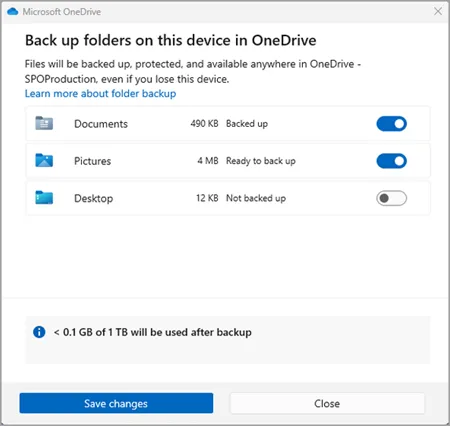
Enable Backup for Desktop, Documents, and Picture Backup within OneDrive
-
Set App defaults within Settings
-
Uninstall bloatware
-
Clean up the taskbar and Start menu bloat
-
Remove Widgets, CoPilot, Shrink the Search menu
-
Pinned apps: File Explorer, Google Chrome, Outlook, Teams
-
Set system sleep times 15-30-30-1Hr.
Shipping:
Section titled “Shipping:”-
Confirm shipping details with the specified user or the POC if it is a spare device.
-
When creating the label, apply the reference “IAB-(TK#)” for billing purposes.
-
Once you have created the tracking label, send the tracking to the user and POC on the public side of the ticket.
-
If shipping from Poway, update the CIT Inventory Sheet to reflect the current CIT Inventory status