PROCEDURE
For some Adstra and Belardi Wong requests, an employee’s direct manager can approve the following activities:
-
Access to BBj
-
Access to Global/Team shared drives
-
Create an MFT account Executive POC: Nerissa Karim (Nerissa.Karim@adstradata.com)
REQUIREMENTS
1Password > Websites > M365 Adstra
1Password > Websites > M365 Belardi Wong
STEPS
- Login to the appropriate M365 tenant
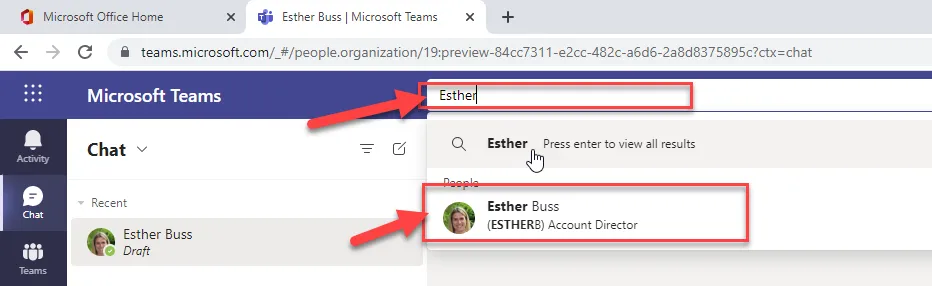
- Launch Teams in the Browser
- Search the user
- Select the user
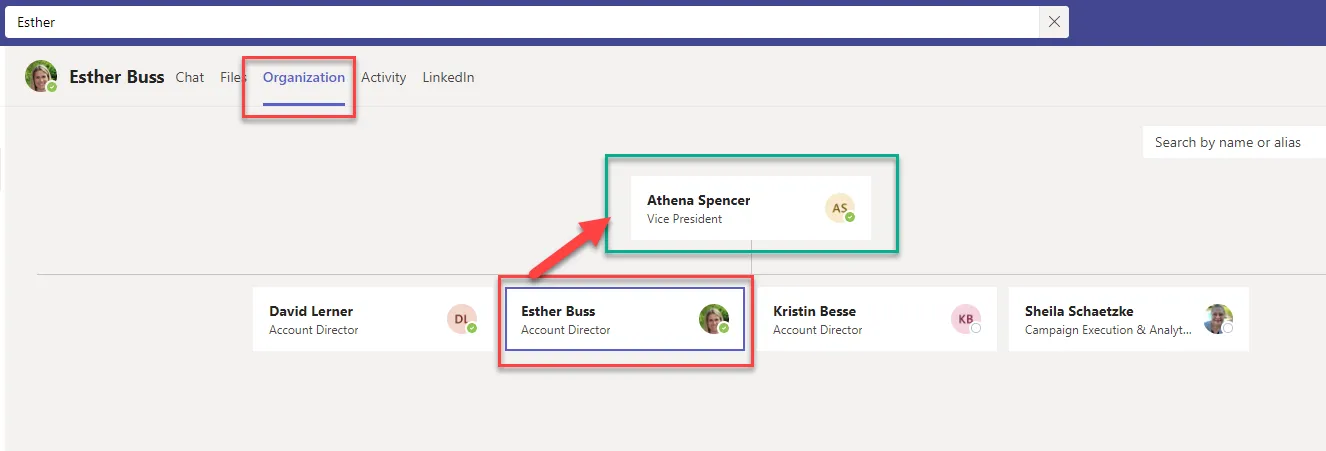
- Click the Organization Tab
- Manager will be above them in the hierarchy
- Add manager to the ticket to obtain their electronic approval for the request
SUCCESS:
-
Manager found above employee in hierarchy
-
Manager’s approval is recorded in the Halo ticket
FAILURE/NEXT STEPS
-
If you are unable to find the user’s Manager reach out to Executive POC (See References Section)
-
If Manager does not provide approval before ticket closeout please reach out to Executive POC (See References Section)
REFERENCES