Western Pump Provisioning Steps
Section titled “Western Pump Provisioning Steps”Domain: wp.local (On-Prem AD [WP-DC01])
-
Create the computer object in the correct Active Directory container based on location.
-
AZ Locations: wp.local > Western Pump > Computers > AZ
-
All Other Locations: wp.local > Western Pump > Computers
VPN: Cisco Secure Client
-
Reference KB00010942 for help
-
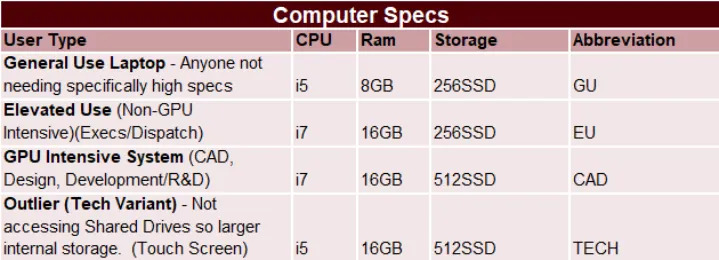
General Use (GU): Lenovo ThinkPad L15
-
Alternate GU: Lenovo ThinkPad T490S
-
Elevated Use (EU): Lenovo ThinkPad T490S
-
GPU Intensive (CAD): Dell XPS 15
-
Alternate CAD: Dell Precision 3000/5000
-
Tech Variant (TECH): Lenovo IdeaPad (Touch Screen)
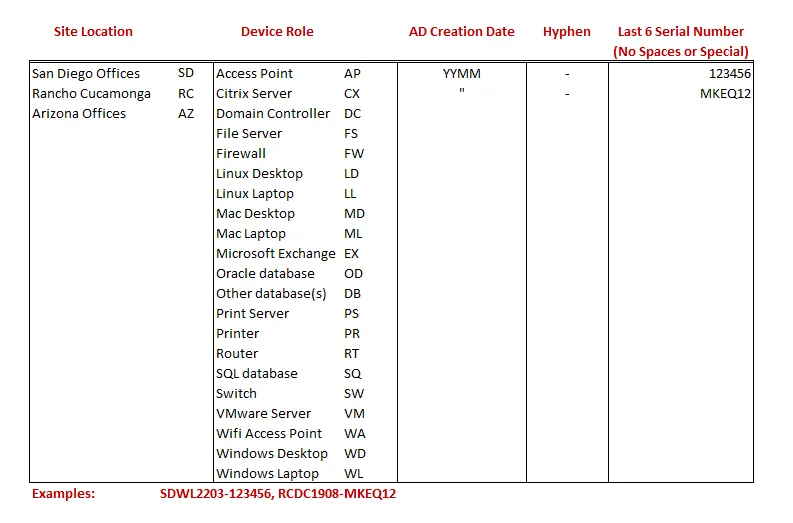
- Default naming schema: [SITE][DEVICE_ROLE][AD_CREATION_DATE_YYMM]-[LAST_6_SN]
KEY ROLES AND RESPONSIBILITIES
Section titled “KEY ROLES AND RESPONSIBILITIES”NOTE: cIT will receive requests for using new and used equipment. Pay close attention to the Computer Selection and Peripheral Selection(s) sections in the provisioning request ticket.
-
Client POC is responsible for having any requested used equipment available for New Hire.
-
Except for Telework Only requests, New & Used computers are configured/imaged at each WP Site Location
-
Device should be connected to the LAN for easier imaging
-
Local POC should be able to assist with the following actions (Reference KB00002147 [retired]):
-
Ensure imaging device is on the network
-
Assist with which printers to add for the user
-
Ensure peripherals are available
-
Tag the device
N-CENTRAL
Section titled “N-CENTRAL”-
N-Central Agent link: Here
-
Site-Specific Registration Tokens:
-
AZ 1432 (Main): 050be231-c64b-2ffd-f815-1430f7713e75
-
AZ 2324: 81228206-2ff3-2843-4d58-6c8e8dbab919
-
RC 9215: 88d5b0f6-81e3-2121-f714-ea3a9a369911
-
SD E-Street: 88d5b0f6-81e3-2121-f714-ea3a9a369911
-
SD F-Street (HQ): 721b7446-fbee-cb92-3a02-fb6eeff0a303
-
Remote Users:
-
AZ - Remote: 050be231-c64b-2ffd-f815-1430f7713e75
-
SD - Remote: b49f86bd-386b-72c1-6447-77330236fd83
-
RC - Remote: df78353c-9340-7a4f-0165-f95b78febc9c
STANDARD SOFTWARE/CONFIGURATION
Section titled “STANDARD SOFTWARE/CONFIGURATION”-
N-Central Agent link: Here
-
M365 Office Apps for Business
-
MS Teams - https://www.microsoft.com/en-us/microsoft-teams/download-app
-
Cisco Secure Client
-
Cisco Umbrella Client+OrgInfo.Json
-
AZ Desktops: Mouse Without Borders (https://www.microsoft.com/en-us/download/details.aspx?id=35460)
-
Edify https://edify.cx/download-edify (telephony service for San Diego & Rancho Cucamonga)
-
IMPORTANT: Gets installed on F-Street, E-Street, and Rancho Cucamonga assigned users
-
Go to device in NCentral (Make sure device is in the right site) > Add Task > Run an Automation Policy
-
Repository Item > WP - Edify
-
Save
REFERENCE GUIDES
Section titled “REFERENCE GUIDES”KB00002065 [retired] - Western Pump - VPN PowerShell Install Script
KB00002147 [retired] - Western Pump - Onsite Computer Setup POCs
KB00002128 - Western Pump - Onboarding Instructions
KB00002152 [retired] - Western Pump - New Computer Request