PROCEDURE
WI for when Western Pump users call in with access issues to the Jonas PBA.
Symptoms > Common Solution:
- End-User Jonas Application freezes or stops responding > Restarting stop Services on the Jonas Server.
- RDP or connection errors > Restarting stop Services and/or processes on the Jonas Server
- Datamart Errors > Jonas Server Services may need restarting, processes on the Jonas Server ended, & application restarted
REQUIREMENTS
- Password State > Domain\Service Accounts > Jonas AD Account
- NCentral > Western Pump > WESTPUMP-JONAS (westpump-jonas.wp.local)
STEPS
- Checking Server Services are running:
- Start > Search & Open Services
- Make sure the following Services are Running:
- Jonas Communication Service
- Jonas Data Watcher Service
- Jonas Digio Service
- Jonas Web Server
- Jonas FileBeat
- SQL Server (MSSQLSERVER)
- SQL Server Agent (MSSQLSERVER)
- SQL Server Analysis Services (MSSQLSERVER)
- SQL Server Analysis Services CEIP (MSSQLSERVER)
- SQL Server Browser (MSSQLSERVER)
- SQL Server CEIP service (MSSQLSERVER)
- SQL Server Reporting Service (MSSQLSERVER)
- Have End-User open/test their Datamart software again
- If issues persist, open Jonas DataMart Interface on the Jonas Server \Desktop
- If you receive the error below:
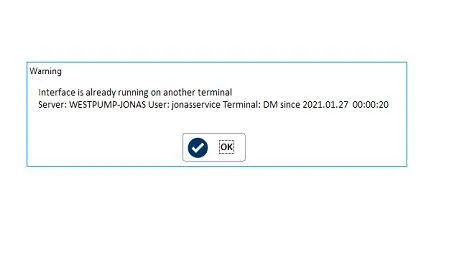
- Open up Task Manager
- Close out DataMart (if running).
- Close out the majority of the processes named PxPlus (Steps provided by previous MSP, please document and update this WI with “all” the processes closed)
- Start > Search cmd > Right-Click > Run as Administrator
- Run the following command
- get-Process -Name sbbwin* | Stop-Process
- NOTE: When you’re down to around 2 or 3 PxPlus processes left, they’ll begin to open up automatically.
- Open up DataMart again, and stay on until it connects and the End-User can start processing WOs.
REFERENCES
None