This procedure is used to locate a phone. In this example, a user accidentally called 911 and the phone needs to be located.
Log into local management PC.
Open “Cisco Unified Real-Time Monitoring Tool”’.

If the tool is not available, please perform the following steps:
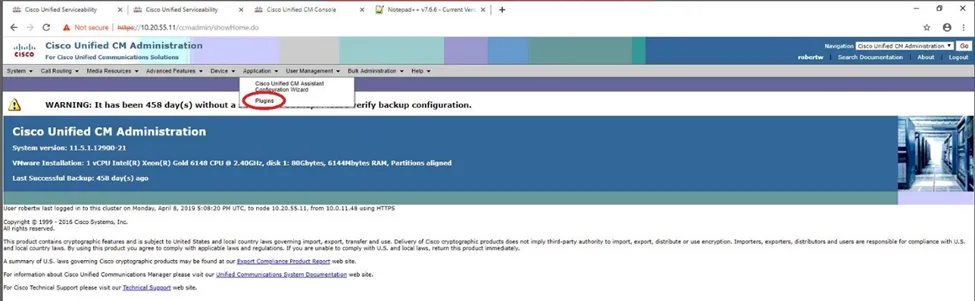
Open browser, go to CUCM (Phone Server) and log in with appropriate credentials.
Go to Applications Tab > Plugins.
On the Plugins screen, leave the fields blank and select Find.

Locate “Cisco Unified Real-Time Monitoring Tool – Windows” from the list. Select Download.
Once downloaded, install the application (use defaults).
Proceed with the following steps:
Enter Host IP Address of server you need to connect to.
Enter in admin credentials to connect to host.
Select No on “Timezone data version mismatch” window.
Select “Default” in Configuration List Window, then click OK.
In the System pane, select Trace & Log Central > Query Wizard.
In the Query Wizard window, create a new query, or select a preset query previously created.
In the Select UCM Services/Applications tab, select and check Cisco CallManager on the host you want to pull the logs. Click Next.
In the Select System Services/Applications tab, select and check Cisco Called Party Tracing. Click Next.
In the Query File Options window, set preferences for search. Default is set to 5 days. Click Next.
Click Run Query on the Action Options window.
When the query is complete, you will receive this window.
To view results, in the Trace & Log Central pane, select Real Time Trace > Query Results > Host Address folder > UCM > Cisco CallManager > Calllogs.
In the call logs, locate the nearest recorded log closest to the time of incident. Double-click to open.
Open With Cisco Generic Viewer, then click OK.
Select ALL content and paste into searchable application, i.e., Notepad++.
In Notepad++, open search window (CRTL+F). In this case search for “+1911”.
Results will appear highlighted. Line items will indicate time and date of incident and origin of the call, including MAC address of the phone.
Once obtained, use the MAC address and search in CUCM to identify the phone that made the call.