Some changes cannot be made in O365 if you use Azure AD Connect or older DirSync. If you try to add an alias email via O365, you will receive a sync error. To work around this, use the following instructions. (Credit: https://blog.netwrix.com/2017/02/02/using-ad-to-add-an-alias-to-an-office-three-six-five-email-account/)
- Find the user in AD manually in the correct OU, and double click to open the user you wish to modify. This will enable you to use the attribute editor when advanced features in on
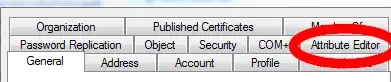
- After opening attribute editor, scroll to the proxyAddress attribute, and double click to open it. You can then add in the alias for the user with the schema smtp:username@domain.com. To make it a default reply to address, make sure SMTP is capitalized
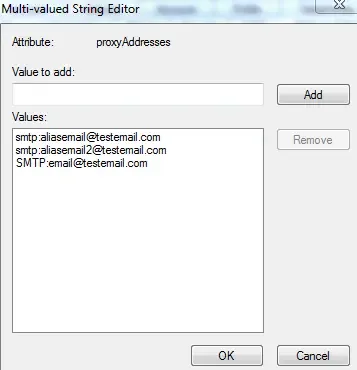
- Once that is done, be patient for it to synchronize, or run a manual sync if you have the option