Summary:
Section titled “Summary:”The standards defined in this article will help guide the project engineers with the configuration of various firewalls.
Assumptions, Risks, or Dependencies:
Section titled “Assumptions, Risks, or Dependencies:”Assumptions:
Section titled “Assumptions:”- None
Risks:
Section titled “Risks:”- Improper configuration of firewalls will result in potential downtime or longer troubleshooting time.
Dependencies:
Section titled “Dependencies:”- General Network Standards
Requirements:
Section titled “Requirements:”Cisco ASA
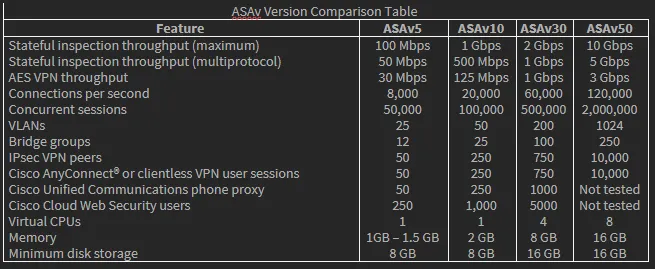
Section titled “Cisco ASA”- For Private Cloud deployments, reference the ASAv Comparison Table to select the appropriate ASAv based on environment requirements
-
Follow Hostname naming standard
-
Follow VLAN standards
-
Set username to unique client-specific username, such as client.fw.adm#### with random number string at the end.
-
Firewall admin password and enable password shall be different.
-
For ASAv deployments, all network interfaces must be VMXNET3, not e1000.
-
Disable Large Receive Offload (LRO) to avoid poor TCP Performance. See Disable LRO for VMware and VMXNET3.
-
For ASAv5, set RAM to 2GB for optimal performance.
-
Int g0/0 shall be the outside interface
-
Int g0/1 shall be the inside interface
-
And additional VLANS shall be the remaining interfaces.
-
SSH from the outside interface will only be allowed on the approved cIT subnets
-
ssh 184.177.101.12 255.255.255.254 outside
-
ssh 70.168.60.192 255.255.255.248 outside
-
ssh 67.207.217.0 255.255.255.0 outside
-
ssh 204.68.124.0 255.255.255.0 outside
-
ssh 70.167.3.0 255.255.255.0 outside
-
ssh 184.188.53.208 255.255.255.248 outside
-
Setup SNMP for N-central Monitoring
-
ASAv must be registered with a valid Cisco Smart License
-
VPN IPSEC Tunnel
-
Use IKEv2 if remote peer supports it. All else, use IKEv1
-
Use AES-256, SHA256, and DH Groups 14 or higher.
-
Each tunnel should use a unique Preshared key. Preshared key will be documented in 1Password.
-
Remote Access VPN
-
RA VPN must be deployed with Multi-Factor Authentication
-
If integrating RA VPN with LDAP, the access must be scoped to a VPN user group. Authorized users shall be added to the VPN group. VPN should not be allowed to all Active Directory Users, especially admin accounts, service accounts, and testing accounts.
-
If integrating RA VPN with AzureAD, the allowed users must be scoped to appropriately licensed M365 users with MFA.
-
Any account with Administrative privileges shall be EXCLUDED from VPN access. This is to limit unauthorize admin access in the event of a breach.
-
For Private Cloud deployments, the *.centrexcloud.com SSL will be used.
-
For on-premise deployments, 3 year single domain SSL will be purchased in the cIT GoDaddy account.
-
VPN SSL URL Naming Standards
-
For Private Cloud Deployments, Create a “clientname.centrexcloud.com” A-Record in DNS Registrar pointing to the WAN IP of the firewall to serve as the client’s VPN URL
-
For on-prem deployments, create “vpn.clientdomain.com” A-record in the client DNS Registrar pointing to the WAN IP of the firewall to serve as the client’s VPN URL
-
The latest VPN Client version shall be uploaded to the firewall.
Meraki MX Appliances
Section titled “Meraki MX Appliances”-
Where applicable, set up firewalls in an HA Configuration
-
HA Requirements
-
Configure the firewall in MX Warm Spare configuration using this guide.
-
Firewalls must be configured with Virtual Uplink IPs
-
Internet circuits must have at least 3 usable IPs on each circuit.
-
WANIP 1 – Virtual IP shared across both firewalls
-
WANIP 2 – IP for MX1
-
WANIP 3 – IP for MX2
-
Each circuit’s WAN IP must share the same broadcast domain on the WAN side.
-
Both MXs should be connected to each other through a downstream switch (or ideally, multiple switches) on the LAN to allow for passing VRRP heartbeats.
-
There should be no more than one additional hop between them, and they must be able to communicate on all VLANs.
-
Make sure STP is enabled on the downstream switching infrastructure, as a properly-configured HA topology will introduce a loop on the network.
-
When first configuring routed HA, the spare should be added and configured in the dashboard before the device is physically deployed, so it will immediately fetch its configuration and behave appropriately.
-
Follow Hostname naming standards
-
Follow VLAN standards
-
Addressing and VLANs
-
Set mode to Routed
-
Set Client Tracking to MAC Address. If there is a layer 3 routing device downstream (if the core switch is handling layer 3 routing) set Client Tracking to IP Address.
-
Firewall
-
Always set Deny Policy to deny guest traffic to data VLANs.
-
Always set IP source address spoofing protection mode to Block.
-
SD WAN & Traffic Shaping
-
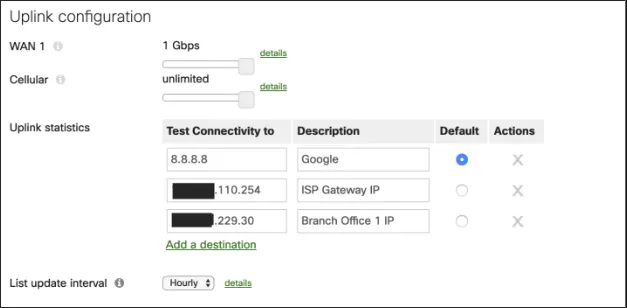
Configure multiple uplink statistics test IPs.
-
General connection to internet, such as google.
-
Connection to ISP Gateway.
-
Connection to remote peer endpoint for VPN connectivity monitoring.
-
Always set List Update Interval to hourly. This is the automatic security list updates for features such as AMP, IDS/IPS, and content URL filtering.
-
If firewall is licensed for Threat Protection:
-
Set AMP Mode to Enabled
-
Set Intrusion Detection and Prevent mode to Prevention
-
Set Ruleset to Balanced.
-
Enable Umbrella Protection
Standard:
Section titled “Standard:”External References:
Section titled “External References:”- EXTERNAL only – i.e., industry best practices, CIS18, this is not for cIT internal references
Definitions:
Section titled “Definitions:”Note: Please add KB relationships to core process, process, SOPs or other WIs on the right.