Standard Ticket Entry
Section titled “Standard Ticket Entry”Public Facing Entries
Section titled “Public Facing Entries”Public facing ticket entries should be written in a manner that is consistent across team members. This will create a better end user experience for our clients independent of the team member that is helping them. It should tell a story to relay the value of the experience to not just the client, but to any member of the client’s organization. Public facing entries are viewed by the point of contacts, client escalations, and executives. The ticket entry should follow a basic format:
Greeting Statement,
Soft skill opening sentence. Summary of issue. Recap of service delivered. Confirmation of resolution or confirmation of agreed upon next step and timeline. Soft skill ending sentence.
Next steps if not resolved.
Closing signature
Technical Details:
- Client friendly summary of service
- Reflecting effort
An example of a ticket entry in the above format:
Hi James,
It was a pleasure assisting you this afternoon. You opened a ticket because you could not access your email from outside the office. We determined that since this has never worked before, that you were missing the necessary VPN set up on your laptop to allow remote connection. We verified that you were authorized to access email remotely and set up the VPN and got you connected. You confirmed that you could now send and receive email form home. I am going to go ahead and close out this ticket. I appreciate your time today and if you have any other issues, please do not hesitate to reach out to us again.
Thanks,
Sarah Moore
Service Desk Manager
Support 619.651.8787 | Main 619.651.8700
centrexIT.com | smoore@centrexIT.com
Internal Ticket Entries
Section titled “Internal Ticket Entries”Internal ticket entries should be written in a manner to relay core troubleshooting and ticket lifecycle information to anyone reading the ticket. Internal entries are used by other team members, escalation engineers, vITM / vCIO, as well as finance and administration to determine if a ticket effort is equal to the time applied and to help move service forward. We should use the “Internal Notes” template provided in Halo. All notes should be entered within 20 minutes of the completed action to ensure that anyone else accessing the ticket has the most accurate and up to date actions taken on the ticket.
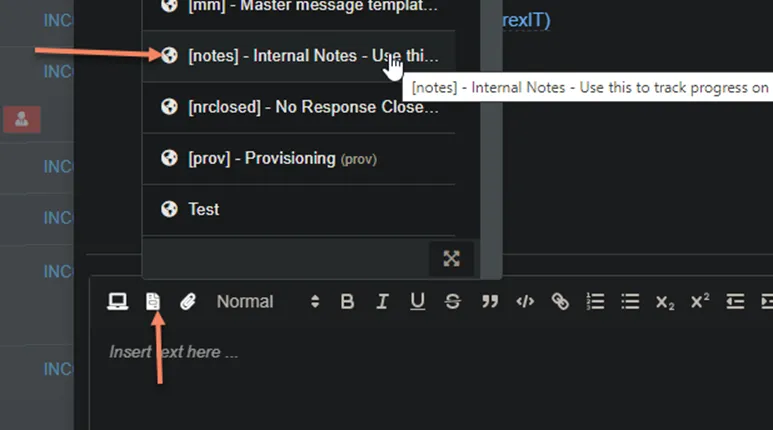
An example of internal entry based on the template:
STEPS TAKEN
======================
- Accessed AD
- Reset password
- Added mail nickname
- Hid from address book
- Accessed O365
- Signed out of all sessions
- Blocked sign in
- Removed mobile devices
- Revoked sessions in Azure AD
NEXT STEPS
======================
- Complete offboarding process
CLIENT EXPECTATIONS
======================
- Informed client that process would be completed by end of day Monday and they would be contacted via email once completed
** All internal notes should be clear and detailed explaining all steps performed on a ticket. Any changes to the original request should be included in the notes. The notes tell the story of the ticket and should be able to be read in a manner that allows someone that does not know the lifecycle of that ticket to understand the full scope of work that was performed on that ticket.
Standard Triage Questions
Section titled “Standard Triage Questions”Based on the client reported issue, there are some standard information gathering required necessary to quantify and qualify the impact of an issue, as well as assist in troubleshooting. Not all of these questions are valid for all issues, however, a lot of this information is available from N-Central.
- The username and machine name affected, and the IP
- Is this affecting just the user or is everyone impact?
- Does it happen the move to computer?
- Where any changes made recently?
- Has it ever worked? (Makes sure if we are not troubleshooting something that never worked in the first place)
- When was the last time it worked properly? (Help to correlate to recent change, update, etc.)
- Are other things working, ok? (Helps to isolate specific system or apps affected)
- Is the user in the main office, branch office, traveling, or work from home?
- Is there a site-to-site VPN or remote access VPN?
- Is the user’s workstation hardwired to wireless?
- When was the last time the system was rebooted?
- Is the Problem Intermittent or Constant?
- Can the Problem be Recreated? (Take screenshots or recording)
- Can you ping the default gateway?
- Can you ping the domain controller IP?
- Can you ping 8.8.8.8?
- Is the item discussed have CI and/or WI/KB?
- Does the client have a valid support contract with the product vendor?
Client Responded
Section titled “Client Responded”When a client responds to a ticket, it needs to be treated like a “New” status. Our success depends on our ability to create a positive user experience for our client. As a standard, all client responded tickets should be reviewed and addressed with the client:
- Within 2 Hours of Client Response
- And before the end of the team members daily the work shift
Additionally, escalations resulting from client responses should be resolved with the Escalations Team and or Service Manager, before the end of the team member’s daily shift.