PROCEDURE
Troubleshooting WI if end-users are getting errors about servers, files, or macros being “untrusted” or “disabled”
Common Errors:


REQUIREMENTS
- PWS > Domain\Service Accounts > Active Directory ALC
- PWS > Domain\Service Accounts > Active Directory Belardiwong
STEPS
- Login to CL-DC01 or BW-NOC-DC1
- Do a search for the end-user’s hostname/computer name
- Open the Computer’s Properties
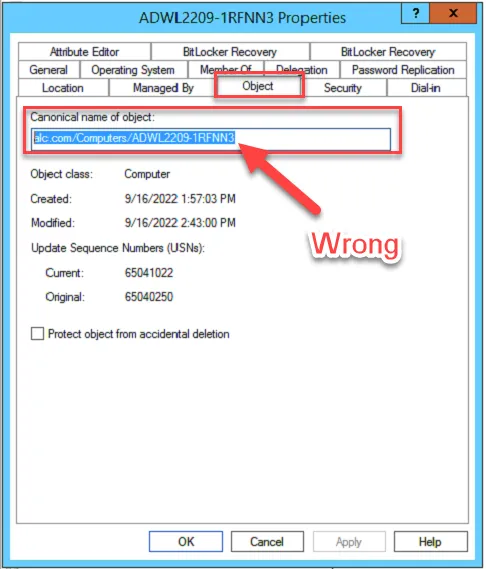
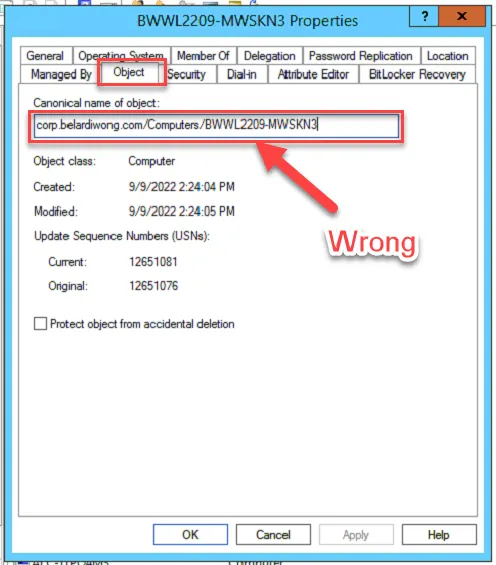
- Go to the Object tab
- Look at the path of the Canonical name of the object
- If the device is located in alc.com > Computers or corp.belardiwong.com > Computers
- Please move them to the appropriate site container based on the user’s location
- Adstra:
- alc.com > Princeton > Workstations
- Belardi Wong:
- corp.belardiwong.com > Belardi Wong > Workstations
- Adstra:
- Once the Computer object is in the right OU, login to the End-User’s computer
- Open CMD with Admin Rights
- Run command & reboot if necessary:
gpupdate /force
REFERENCES